VerseGrip 位置制御チュートリアル
このチュートリアルでは、VerseGripの回転を利用して『Inverse3 』のキャラクターのカーソル位置を直接制御する方法を紹介するとともに、Unityのメインスレッドをバイパスして高頻度での更新を実現する方法を解説します。
概要
と 入門ガイド 上記の手法とは異なり(この手法は標準の更新周波数である60Hzで動作します)、本チュートリアルでは、VerseGripデバイスの回転に応じて、Inverse3 のカーソル位置をより高い周波数(1~4kHz)で動的に調整することを目的としています。
これは、触覚スレッドによってトリガーされる DeviceStateChanged 事件によって実現された。
シーン設定
まず、Haptic Rig を作成します:GameObject >Haply > Haptic Rig (one hand)。具体的な手順については、入門ガイドをご覧ください。
VerseGripPositionControl コンポーネント
「」という名前の VerseGripPositionControl.cs 新しい C# スクリプトを作成し、それを ハプティック・オリジン ゲームオブジェクト上で。
で VerseGripPositionControl このクラスには、以下のプロパティが定義されています:
public Inverse3 inverse3;
public VerseGrip verseGrip;

[Range(0, 1)]
public float speed = 0.5f;

[Range(0, 0.2f)]
public float movementLimitRadius = 0.2f;

private Vector3 _targetPosition;
- inverse3:Inverse3 デバイスへの参照は、Inspectorで設定します。
- verseGrip:カーソル制御用の VerseGrip デバイスへの参照。
- speed:カーソルの移動速度。
- movementLimitRadius:カーソルが初期位置から移動できる最大距離。
- _targetPosition:カーソルが向かっているターゲットの位置。
Awake メソッド
で Awake その方法の中で、登録 Ready イベント。これにより、Inverse3 デバイスのワークスペースの中心に基づいて、カーソルのターゲット位置を初期化します:
private void Awake()
{
    inverse3.Ready.AddListener((inverse3Controller, args) =>
    {
        _targetPosition = inverse3Controller.WorkspaceCenterLocalPosition;
    });
}
デバイスの準備が整うまでは、左右の配置が確定していないため、ワークスペースの中心を取得できません。
実装 OnDeviceStateChanged VerseGrip の回転およびボタンの操作に基づいて、カーソルの目標位置を計算する方法:
private void OnDeviceStateChanged(object sender, VerseGripEventArgs args)
{
    var verseGrip = args.DeviceController;
    // Calculate the direction based on the VerseGrip's rotation
    var direction = verseGrip.Orientation * Vector3.forward;

    // Check if the VerseGrip button is pressed down
    if (verseGrip.GetButtonDown())
    {
        // Initialize target position
        _targetPosition = inverse3.CursorLocalPosition;
    }

    // Check if the VerseGrip button is being held down
    if (verseGrip.GetButton())
    {
        // Move the target position toward the grip direction
        _targetPosition += direction * (0.0001f * speed);

        // Clamp the target position within the movement limit radius
        var workspaceCenter = inverse3.WorkspaceCenterLocalPosition;
        _targetPosition = Vector3.ClampMagnitude(_targetPosition - workspaceCenter, movementLimitRadius)
            + workspaceCenter;
    }
    // Move cursor to new position
    inverse3.SetCursorLocalPosition(_targetPosition);
}
で OnEnable 和 OnDisable 登録と登録解除 DeviceStateChanged 事件。
/// Subscribes to the DeviceStateChanged event.
private void OnEnable()
{
    verseGrip.DeviceStateChanged += OnDeviceStateChanged;
}

/// Unsubscribes from the DeviceStateChanged event.
private void OnDisable()
{
    verseGrip.DeviceStateChanged -= OnDeviceStateChanged;
}
ゲームプレイ
- Inverse3 機器をしっかりと固定し、十分な移動スペースを確保してください。
- 再生モード(Play Mode)に入り、Inverse3 のカーソルを長押しします。
- VerseGrip を回転させると、Unity のシーン内でカーソルの動きが確認できます。この動きは、VerseGrip の向きと直接対応しています。
- VerseGripのボタンを押すと、Inverse3 のカーソルがVerseGripの回転方向に沿って移動し、リアルタイムでの制御効果が確認できます。
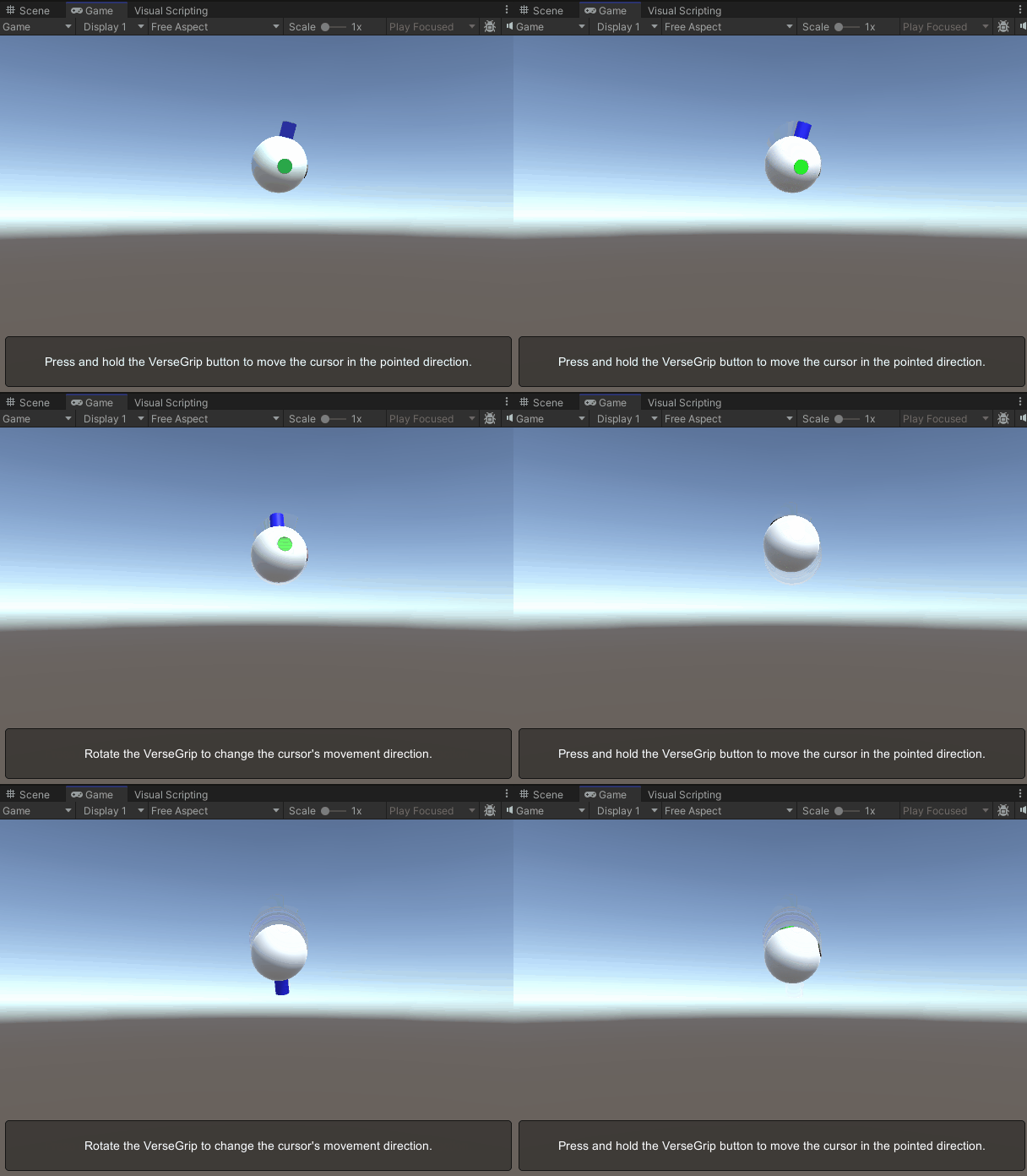
この画像は、カーソルモデルを示しており、前方向の軸が明確に識別できるようハイライト表示されています。 カーソルモデルのカスタマイズに関する詳細については、カーソルに関するドキュメントを参照してください。
ソースファイル
このサンプルで使用されている最終的なシーンおよび関連するすべてのファイルは、Unityのパッケージマネージャーにある「Tutorials」サンプルからインポートできます。
VerseGripPositionControl.cs
/*
 * Copyright 2024 Haply Robotics Inc. All rights reserved.
 */

using Haply.Inverse.DeviceControllers;
using Haply.Inverse.DeviceData;
using UnityEngine;

namespace Haply.Samples.Tutorials._6_VerseGripPositionControl
{
    /// <summary>
    /// Demonstrates how to control the device cursor position using the VerseGrip.
    /// </summary>
    public class VerseGripPositionControl : MonoBehaviour
    {
        public Inverse3Controller inverse3;
        public VerseGripController verseGrip;

        [Tooltip("Cursor moving speed")]
        [Range(0, 1)]
        public float speed = 0.5f;

        [Tooltip("Maximum radius for cursor movement")]
        [Range(0, 0.1f)]
        public float movementLimitRadius = 0.075f;

        private Vector3 _targetPosition; // Target position for the cursor

        private void Awake()
        {
            inverse3.Ready.AddListener((inverse3Controller, args) =>
            {
                _targetPosition = inverse3Controller.WorkspaceCenterLocalPosition;
            });
        }

        /// <summary>
        /// Subscribes to the DeviceStateChanged event.
        /// </summary>
        private void OnEnable()
        {
            verseGrip.DeviceStateChanged += OnDeviceStateChanged;
        }

        /// <summary>
        /// Unsubscribes from the DeviceStateChanged event.
        /// </summary>
        private void OnDisable()
        {
            verseGrip.DeviceStateChanged -= OnDeviceStateChanged;
            inverse3.Release();
        }

        private void OnDeviceStateChanged(object sender, VerseGripEventArgs args)
        {
            var verseGrip = args.DeviceController;
            // Calculate the direction based on the VerseGrip's rotation
            var direction = verseGrip.Orientation * Vector3.forward;

            // Check if the VerseGrip button is pressed down
            if (verseGrip.GetButtonDown())
            {
                // Initialize target position
                _targetPosition = inverse3.CursorLocalPosition;
            }

            // Check if the VerseGrip button is being held down
            if (verseGrip.GetButton())
            {
                // Move the target position toward the grip direction
                _targetPosition += direction * (0.0001f * speed);

                // Clamp the target position within the movement limit radius
                var workspaceCenter = inverse3.WorkspaceCenterLocalPosition;
                _targetPosition = Vector3.ClampMagnitude(_targetPosition - workspaceCenter, movementLimitRadius)
                    + workspaceCenter;
            }
            // Move cursor to new position
            inverse3.SetCursorLocalPosition(_targetPosition);
        }
    }
}