動的なシーンにおける力覚フィードバックのチュートリアル
基本的な力覚フィードバックのチュートリアルを基に、このガイドでは、Unity 内で動的なインタラクションをシミュレートし、ユーザーが移動するオブジェクトからの力覚フィードバックを感じられるようにする方法をご紹介します。 このシナリオでは、力覚フィードバックにおいて高頻度の更新が必要であることが浮き彫りになります。これは、Unity における視覚的なレンダリングの一般的な更新頻度を大幅に上回るものです。
はじめに
説得力のある力覚体験、特に動的なシーンにおいては、1kHz以上の周波数で計算を行うことが極めて重要です。 これは、通常約60Hzで動作するゲームの更新ループとは大きく異なります。 課題は、これらの高頻度の更新をメインのゲームループと並行して管理し、一貫性と正確性を備えた力覚フィードバックを維持するために、スレッドセーフなデータ交換を確保することにあります。
基本的な力覚フィードバックのセットアップの拡張
基本的な力覚フィードバックチュートリアルのシーン設定から始めます。動的な動きを取り入れるために、SphereForceFeedback スクリプトを適用し、球体の動きに反応して、動的に移動するオブジェクトとの相互作用をシミュレートできるようにします。
主な変更点
- 動的オブジェクトの移動:ユーザー入力やあらかじめ定義された動きのパターンに基づいて、Sphere の位置と速度を更新するロジックを組み込みます。
- スレッドセーフなデータ交換:
ReaderWriterLockSlimを使用して、メインスレッドと力覚スレッド間の共有データへの同時アクセスを管理します。 - 力の計算の調整:
SphereForceFeedback.ForceCalculationメソッドを変更し、球体の速度を考慮することで、位置と動きの両方に基づいた現実的なフィードバックを提供します。
動的なインタラクション
動く球体をシミュレートするには、Update メソッドを使用して位置を手動で更新するか、キーボード入力やその他の操作に基づいて移動を制御する別のコンポーネントを使用できます。
この例では、スフィア ゲームオブジェクトの名前を ムービング・ボール に変更し、チュートリアル サンプルに含まれる MovingObject コンポーネントを追加します。
移動に対応した ForceCalculation の調整
力覚フィードバックの計算では、「Moving Ball」の速度を考慮する必要が生じ、インタラクションの位置と速度の両方に基づいて力を調整します。 これにより、より繊細で現実味のある力覚が得られ、インタラクションの動的な性質が反映されます。
Vector3型のメソッドパラメータotherVelocityを追加しますforce -= cursorVelocity * dampingをforce -= (cursorVelocity - otherVelocity) * dampingに置き換えます
private Vector3 ForceCalculation(Vector3 cursorPosition, Vector3 cursorVelocity, float cursorRadius,
    Vector3 otherPosition, Vector3 otherVelocity, float otherRadius)
{
    var force = Vector3.zero;

    var distanceVector = cursorPosition - otherPosition;
    var distance = distanceVector.magnitude;
    var penetration = otherRadius + cursorRadius - distance;

    if (penetration > 0)
    {
        // Normalize the distance vector to get the direction of the force
        var normal = distanceVector.normalized;

        // Calculate the force based on penetration
        force = normal * penetration * stiffness;

        // Calculate the relative velocity
        var relativeVelocity = cursorVelocity - otherVelocity;

        // Apply damping based on the relative velocity
        force -= relativeVelocity * damping;
    }

    return force;
}
スレッドセーフなデータ交換
オブジェクトがリアルタイムで移動・相互作用する動的なシーンでは、同時アクセスによるデータ破損を引き起こすことなく、触覚フィードバックの計算が常に最新のデータに基づいていることを保証することが極めて重要です。 ここで、スレッドセーフなデータ交換が不可欠となります。
スレッドセーフなデータ交換の主要な概念
- スレッドセーフな仕組み:
ReaderWriterLockSlimを使用して、同時データアクセスを管理します。これにより、複数の読み取り操作や単一の書き込み操作が可能となり、データの整合性が保たれます。 - データの読み取りと書き込み:
- 読み取り:触覚スレッドは、読み取りロックがかけられた状態でオブジェクトの位置と速度を読み取ります。これにより、データの更新を妨げないようにします。
- 書き込み:メインスレッドによるオブジェクトデータの更新は、書き込みロックがかけられた状態で行われます。これにより、同時に行われる読み取りや書き込みによってデータの一貫性が損なわれるのを防ぎます。
Unity での実装
-
シーンデータ用の構造体:スレッドセーフな操作を容易にするため、シーンに関するすべての必要なデータを保持する構造体を定義します。 この構造体には、Moving Ballとカーソルの位置および速度、ならびにそれぞれの半径が含まれます。 このデータ構造が、スレッドセーフなデータ交換の基盤となります。
private struct SceneData{public Vector3 ballPosition;public Vector3 ballVelocity;public float ballRadius;public float cursorRadius;}private SceneData _cachedSceneData; -
ロックの初期化: シーンデータへのアクセスを管理するために、
ReaderWriterLockSlimインスタンスを初期化します。 このロックにより、複数のスレッドが同時にデータを読み取ったり、単一のスレッドが書き込みのためにデータを排他的にロックしたりすることができるため、同時操作中のデータの整合性が確保されます。private ReaderWriterLockSlim _lock = new ReaderWriterLockSlim(); -
書き込みロックによるキャッシュへの書き込み:
SaveSceneDataこのメソッドは、書き込みロック下でシーンデータを更新します。 これにより、あるスレッドがデータを更新している間は、他のスレッドは読み取りも書き込みもできなくなり、データ競合が防止され、一貫性が確保されます。private void SaveSceneData(){_cacheLock.EnterWriteLock();try{var t = transform;_cachedSceneData.ballPosition = t.position;_cachedSceneData.ballRadius = t.lossyScale.x / 2f;_cachedSceneData.cursorRadius = inverse3.Cursor.Radius;_cachedSceneData.ballVelocity = _movableObject.Velocity;}finally{_cacheLock.ExitWriteLock();}} -
読み取りロックによるキャッシュからの読み取り:
GetSceneDataこのメソッドは、読み取りロックをかけてシーンデータを取得します。 これにより、複数のスレッドが書き込み操作を妨げることなく、データを安全かつ同時に読み取ることができ、触覚フィードバックの計算が最新のシーンデータに基づいて行われることが保証されます。private SceneData GetSceneData(){_cacheLock.EnterReadLock();try{return _cachedSceneData;}finally{_cacheLock.ExitReadLock();}} -
メインスレッドでのデータ更新:
FixedUpdateこのメソッドは、メインスレッドでシーンデータを定期的に更新するために使用されます。 これにより、触覚フィードバックの計算が常に最新のデータにアクセスできるようになり、シーンの動的な性質が反映されます。private void FixedUpdate(){SaveSceneData();} -
更新されたデータを用いた力計算の適用:
OnDeviceStateChangedコールバック内では、スレッドセーフな方法で取得した最新のシーンデータを用いて力の計算を行います。これにより、力のフィードバックが正確になり、シーン内の動的なインタラクションに対して応答性が保たれます。var sceneData = GetSceneData();var force = ForceCalculation(device.CursorLocalPosition, device.CursorLocalVelocity, sceneData.cursorRadius,sceneData.ballPosition, sceneData.ballVelocity, sceneData.ballRadius);
ゲームプレイ体験
これらのスクリプトの拡張機能により、シーン内を能動的に移動する球体とインタラクションできるようになります。 触覚フィードバックは球体の軌道に応じて動的に変化し、より没入感があり、触覚的にも豊かな体験を提供します。
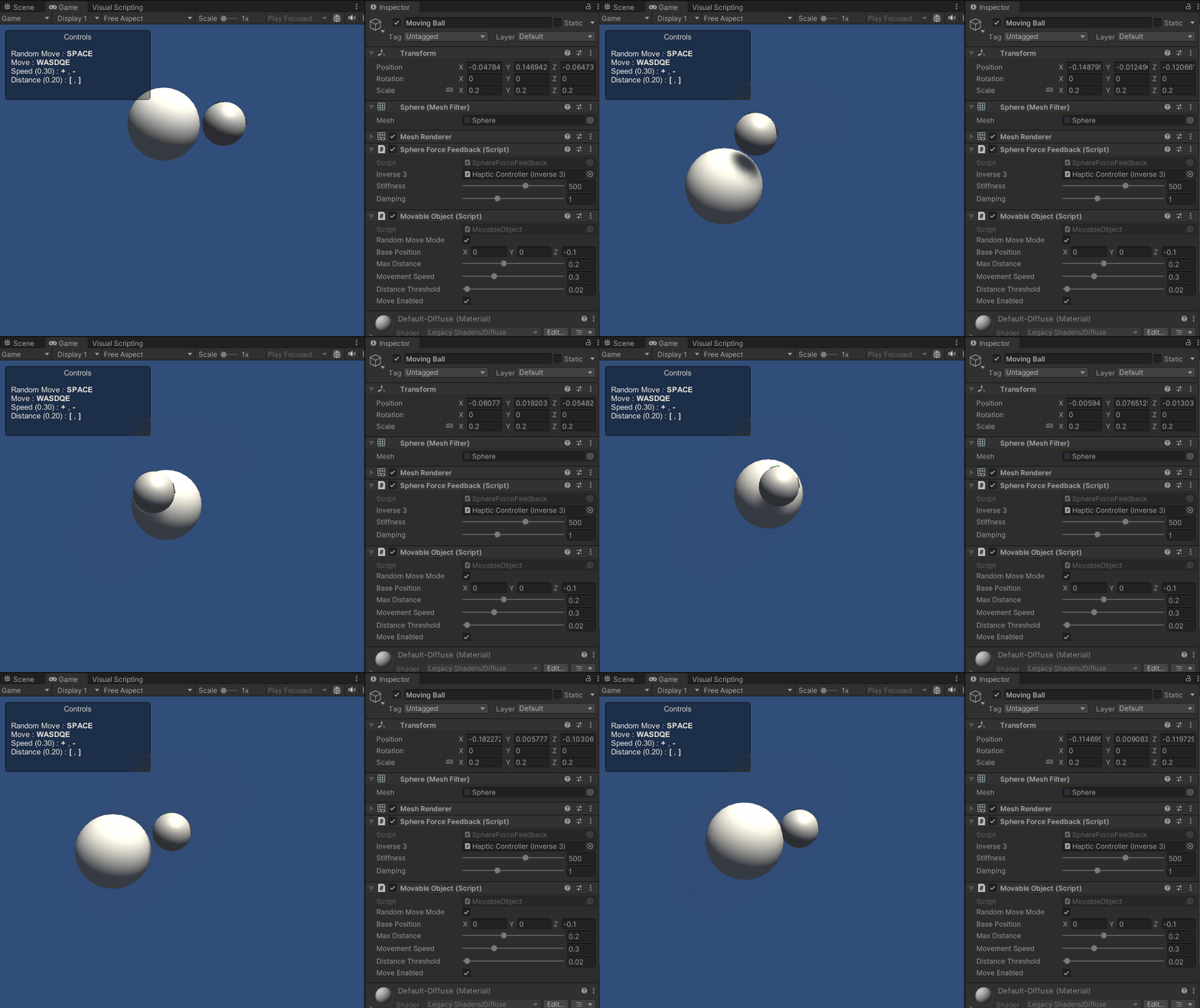
ソースファイル
この例のシーンおよび関連ファイルは、Unity Package Manager の「Tutorials」サンプルからインポートできます。
チュートリアル サンプルには、複数の例で使用されている
MovableObjectスクリプトが含まれており、キーボード入力によって、アタッチされたゲームオブジェクトの移動を制御します。
スフィアフォースフィードバック.cs
/*
* Copyright 2024 Haply Robotics Inc. All rights reserved.
*/
using System.Threading;
using Haply.Inverse.DeviceControllers;
using Haply.Inverse.DeviceData;
using Haply.Samples.Tutorials.Utils;
using UnityEngine;
namespace Haply.Samples.Tutorials._4A_DynamicForceFeedback
{
public class SphereForceFeedback : MonoBehaviour
{
// must assign in inspector
public Inverse3Controller inverse3;
[Range(0, 800)]
// Stiffness of the force feedback.
public float stiffness = 500f;
[Range(0, 3)]
public float damping = 1f;
#region Thread-safe cached data
/// <summary>
/// Represents scene data that can be updated in the Update() call.
/// </summary>
private struct SceneData
{
public Vector3 ballPosition;
public Vector3 ballVelocity;
public float ballRadius;
public float cursorRadius;
}
/// <summary>
/// Cached version of the scene data.
/// </summary>
private SceneData _cachedSceneData;
private MovableObject _movableObject;
/// <summary>
/// Lock to ensure thread safety when reading or writing to the cache.
/// </summary>
private readonly ReaderWriterLockSlim _cacheLock = new();
/// <summary>
/// Safely reads the cached data.
/// </summary>
/// <returns>The cached scene data.</returns>
private SceneData GetSceneData()
{
_cacheLock.EnterReadLock();
try
{
return _cachedSceneData;
}
finally
{
_cacheLock.ExitReadLock();
}
}
/// <summary>
/// Safely updates the cached data.
/// </summary>
private void SaveSceneData()
{
    _cacheLock.EnterWriteLock();
    try
    {
        var t = transform;
        _cachedSceneData.ballPosition = t.position;
        _cachedSceneData.ballRadius = t.lossyScale.x / 2f;

        _cachedSceneData.cursorRadius = inverse3.Cursor.Radius;

        _cachedSceneData.ballVelocity = _movableObject.Velocity;
    }
    finally
    {
        _cacheLock.ExitWriteLock();
    }
}
#endregion
/// <summary>
/// Saves the initial scene data cache.
/// </summary>
private void Start()
{
inverse3 ??= FindFirstObjectByType<Inverse3Controller>();
inverse3.Ready.AddListener((device, args) => SaveSceneData());
_movableObject = GetComponent<MovableObject>();
}
/// <summary>
/// Update scene data cache.
/// </summary>
private void FixedUpdate()
{
if (inverse3.IsReady)
{
SaveSceneData();
}
}
/// <summary>
/// Subscribes to the DeviceStateChanged event.
/// </summary>
private void OnEnable()
{
inverse3.DeviceStateChanged += OnDeviceStateChanged;
}
/// <summary>
/// Unsubscribes from the DeviceStateChanged event.
/// </summary>
private void OnDisable()
{
inverse3.DeviceStateChanged -= OnDeviceStateChanged;
inverse3.Release();
}
/// <summary>
/// Calculates the force based on the cursor's position and another sphere position.
/// </summary>
/// <param name="cursorPosition">The position of the cursor.</param>
/// <param name="cursorVelocity">The velocity of the cursor.</param>
/// <param name="cursorRadius">The radius of the cursor.</param>
/// <param name="otherPosition">The position of the other sphere (e.g., ball).</param>
/// <param name="otherVelocity">The velocity of the other sphere (e.g., ball).</param>
/// <param name="otherRadius">The radius of the other sphere.</param>
/// <returns>The calculated force vector.</returns>
private Vector3 ForceCalculation(Vector3 cursorPosition, Vector3 cursorVelocity, float cursorRadius,
Vector3 otherPosition, Vector3 otherVelocity, float otherRadius)
{
var force = Vector3.zero;
var distanceVector = cursorPosition - otherPosition;
var distance = distanceVector.magnitude;
var penetration = otherRadius + cursorRadius - distance;
if (penetration > 0)
{
// Normalize the distance vector to get the direction of the force
var normal = distanceVector.normalized;
// Calculate the force based on penetration
force = normal * penetration * stiffness;
// Calculate the relative velocity
var relativeVelocity = cursorVelocity - otherVelocity;
// Apply damping based on the relative velocity
force -= relativeVelocity * damping;
}
return force;
}
/// <summary>
/// Event handler that calculates and send the force to the device when the cursor's position changes.
/// </summary>
/// <param name="sender">The Inverse3 data object.</param>
/// <param name="args">The event arguments containing the device data.</param>
private void OnDeviceStateChanged(object sender, Inverse3EventArgs args)
{
var inverse3 = args.DeviceController;
var sceneData = GetSceneData();
// Calculate the moving ball force.
var force = ForceCalculation(inverse3.CursorLocalPosition, inverse3.CursorLocalVelocity, sceneData.cursorRadius,
sceneData.ballPosition, sceneData.ballVelocity, sceneData.ballRadius);
// Apply the force to the cursor.
inverse3.SetCursorLocalForce(force);
}
}
}